Wired, wireless or smart? Before comparing brands and features, check the heating or cooling system that the thermostat must control. This guide explains the compatibility, installation and comfort questions that matter most.
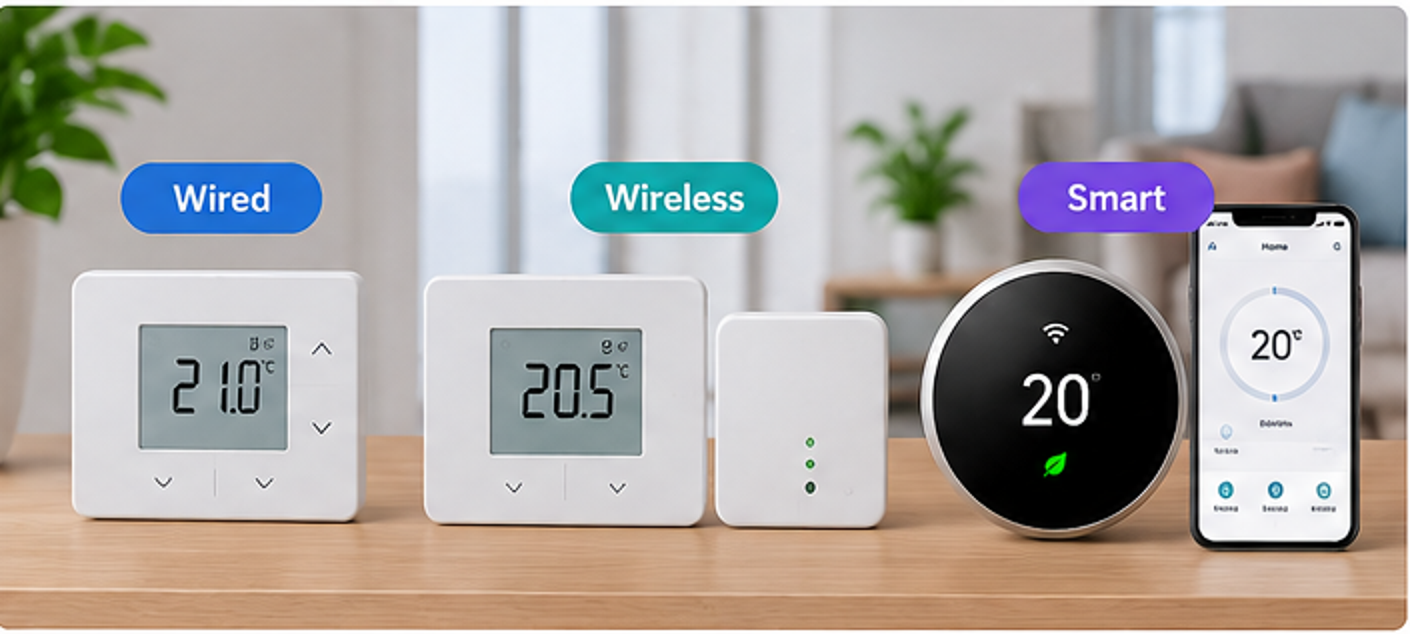
Start with compatibility, not connectivity. A thermostat may be Wi-Fi-enabled, yet still require specific low-voltage HVAC wiring or a proprietary boiler receiver. A wireless RF thermostat does not necessarily connect to the internet. Never choose solely by the labels “smart”, “wireless”, or “universal”.
1. Wired, Wireless or Smart: What Is the Difference?
Wired thermostats
The thermostat connects to the controlled system through wiring. Depending on the model, it may switch a relay, use a boiler communication protocol or communicate over a building-control network.
Wireless RF thermostats
A room unit sends radio commands to a compatible receiver near the heating equipment. The receiver still needs the correct electrical connection. Many RF systems work without a home Wi-Fi network.
Smart thermostats
Connected features can include app control, schedules, remote monitoring and integration with other devices. The thermostat may communicate with the equipment through wires, an RF receiver or a manufacturer hub.
The categories can overlap. For example, a smart thermostat may use a wireless room-to-receiver link, while the receiver connects by cable to the boiler. AirAlign groups internet-connected products under Smart Thermostats so shoppers can find them by their primary experience.
2. Check Your Heating and Cooling System First
Identify the equipment, model number, country-specific version and existing controls before comparing thermostats. The same-looking thermostat may be sold with different regional wiring or receiver options.
| System / control | What to verify |
|---|---|
| Boiler with on/off control | Whether the boiler expects a dry (volt-free) contact or a switched-voltage input; terminal ratings; heating-only versus hot-water channels. |
| Modulating boiler / OpenTherm | Whether both boiler and thermostat support the same protocol. Relay-only controls cannot automatically deliver OpenTherm modulation. |
| North American 24 VAC HVAC | Heat/cool stages, heat-pump support, reversing valve, auxiliary or emergency heat, C-wire requirements and compatibility checker results. |
| Underfloor heating | Whether the thermostat is for electric floor heating or water-based zoning; required floor sensor, relay load and actuator/control centre. |
| Fan-coil / commercial HVAC | Fan speed, valve type, control voltage, changeover inputs and protocols such as KNX where applicable. |
Important safety distinction: 24 VAC HVAC wiring, mains-powered switching, volt-free contacts and proprietary communication buses are not interchangeable. Never connect an incompatible thermostat or guess terminal functions from wire colours. Check manufacturer diagrams and use a qualified installer where required.
Country-specific products matter: equipment designed for US/Canadian 24 VAC forced-air HVAC may not directly replace a UK boiler controller; UK boiler products may require manufacturer-specific receivers and local electrical arrangements.
3. Power Supply, Receiver and Installation Requirements
Look beyond the phrase “battery powered.” Check separately how the room unit, receiver and Wi-Fi hub are powered. A battery-powered RF room thermostat may still require a mains-powered receiver. A smart thermostat may require a C-wire, adapter, bridge or branded hub.
- Room unit: battery chemistry, replacement intervals, mains or low-voltage power and mount type.
- Receiver: whether included in the retail kit; operating voltage, contact type and relay rating.
- Networking: compatible Wi-Fi band, hub/bridge requirements, internet availability and app support.
- Expansion: additional wireless sensors, radiator valves, zones or room thermostats supported by the same system.
When replacing a controller, note both the thermostat model and the receiver/controller model; verify all equipment wiring at the controlled appliance.
4. Compare Comfort and Scheduling Features
A good thermostat should make the home comfortable without unnecessary heating or cooling. Consider the display readability, control precision, setpoint limits, local schedule editing, frost protection, temporary override, vacation modes and accessibility.
Programmable vs non-programmable
A simple thermostat holds a target temperature. A programmable thermostat can change the target throughout the day or week. A smart thermostat may add remote scheduling, occupancy features or adaptive control, but these are not universal capabilities.
Accuracy is not the same as control performance
Published sensor accuracy, setpoint resolution, switching differential (hysteresis) and control algorithm describe different things. Compare only specifications that refer to the same measurement or control behaviour; a smaller display increment does not itself guarantee better temperature control.
Energy savings depend on the system
Using an appropriate schedule and sensible temperature settings may help reduce waste. Actual savings depend on insulation, climate, occupancy, system design and control setup. Avoid assuming a specific percentage saving from “smart” branding alone. Heat pumps may need different setback strategies from conventional boilers.
5. Smart Connectivity, Reliability and Privacy
Smart features can be valuable if they fit your routine: phone control, occupancy-based automation, remote sensors, maintenance notifications, voice platforms or open integrations. Confirm which functions still work if the internet service or vendor cloud is unavailable.
- Check Wi-Fi frequency, app operating-system support and region restrictions.
- Confirm how long software updates and security support are expected, and whether account registration is mandatory.
- Review the vendor’s data collection and privacy controls if occupancy, location or air-quality monitoring is enabled.
- Check whether multiple room sensors actually control different zones or simply influence one shared thermostat.
Some smart thermostats include indoor-air-quality features, but measuring temperature or humidity does not mean a device measures CO₂, PM2.5 or other pollutants. Verify the sensor list before treating the product as an air-quality monitor.
6. Choose the Right Location
The main room sensor should generally be placed where it represents occupied-room conditions, following the manufacturer’s instructions. Avoid locations affected by direct sunlight, draughts, radiators, cooking heat or poorly ventilated enclosed spaces. In multi-zone systems, plan the room sensors and zone controls together.
For an RF device, check radio range in the actual building; walls, reinforced concrete, metal cabinets and nearby electronics can affect communication.
7. Common Mistakes to Avoid
- Buying by appearance or app compatibility first. Always verify the system interface and wiring.
- Assuming wireless means Wi-Fi. Receiver-based RF models may offer no remote app control.
- Confusing on/off switching with modulation. OpenTherm and other protocols need matching support on both sides.
- Ignoring the exact product code. A model family can include batteries, mains, wired, RF and region-specific variants.
- Forgetting accessories. Receiver, hub, wiring centre, transformer and sensors may be sold separately.
- Overlooking heat-pump or multi-stage compatibility. Not all thermostats support reversing valves, auxiliary heating or multiple zones.
- Relying on unsupported energy-saving promises. Look for a suitable control strategy and realistic operating assumptions.
8. Room Thermostat Buying Checklist
- Identify the heating/cooling equipment model and country-specific system.
- Verify On/Off, OpenTherm, 24 VAC, KNX or other relevant control protocol.
- Check required electrical contact, voltage and load ratings.
- Decide whether the room unit should be wired, RF or app-connected.
- Check receiver, bridge, hub and C-wire/power requirements.
- Compare schedule options, temperature controls and ease of use.
- Verify wireless range, Wi-Fi band, app support and offline operation.
- Check multi-zone, radiator-valve, sensor and hot-water requirements.
- Confirm the exact manufacturer SKU and its technical documentation.
- Plan safe installation and long-term service or replacement support.
Practical recommendation: A compatible, easy-to-use basic thermostat is often the right choice when remote control is unnecessary. Choose RF when room-unit placement makes wiring impractical. Choose smart controls when you specifically benefit from app functions, scheduling, sensors or system integration—not simply because the product is labelled “smart”.
Explore Room Thermostats on AirAlign
Filter these collections by brand, compare available model profiles and open each product’s manufacturer technical references.
Wired Thermostats → · Wireless Thermostats → · Smart Thermostats →
Brands covered by AirAlign include General Life, Honeywell Home (Resideo), Siemens, Schneider Electric, Danfoss, ecobee and Google Nest. Not every brand has models in each category or country.
References and Further Reading
- Energy Saving Trust — Heating controls (updated September 2026).
- Energy Saving Trust — The most economical ways to use your central heating.
- US Department of Energy — Programmable Thermostats.
- Resideo — Honeywell Home thermostat catalog.
Published October 2026. This is general product-selection information, not wiring or electrical installation instructions. Technical details and regional availability should always be checked against official manufacturer documentation.